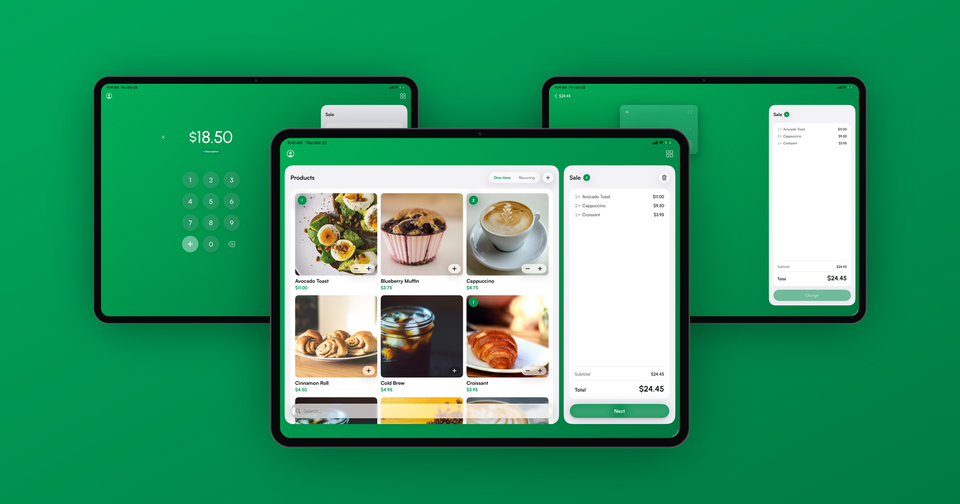
You can now show your products as a grid of photos in the Payment app. Instead of a list of names and prices, your catalog becomes a set of large tiles with each product's image, name and price, and it works on iPhone, iPad, Android phones and Android tablets.
A list is great when you know exactly what you're looking for. However, plenty of businesses sell by sight. A bakery owner looks for the croissant, not the word "croissant", and a busy coffee bar wants the cappuccino to be the brown cup in the top right corner every time. A grid makes that possible.
How do I turn it on?
Open Settings in the app and turn on Show products as a grid. The setting is saved on each device, so the iPad on your counter can show the grid while your own phone keeps the list. It also stays put when you switch between Stripe accounts.
How does the grid work?
Phones show two products across and tablets show three. Tap a tile to add the product to the sale, and a badge on the tile counts how many you've added. Once a product is in the sale, − and + buttons appear on its tile so you can adjust the quantity without leaving the catalog. Products with several prices, like a coffee in three sizes, show as a single tile that opens its prices when tapped.
Imagine the following scenario: a customer at your market stall points at two blueberry muffins and an avocado toast. Tap the muffin twice and the toast once, and the badges read 2 and 1. The total at the top updates as you go, and you're ready to take the payment.
Where do the photos come from?
The photos are the product images you already have in Stripe. There is nothing to upload to the app. To add or change one, open your Stripe Dashboard, go to the Product catalog, select the product and upload an image. Stripe accepts up to eight images per product, and the app uses the first one. The new photo shows up the next time the app loads your catalog.
In some cases a product won't have a photo at all. Those products show a colored tile with the product's initials, so the grid still looks tidy while you work through your catalog. For the best results, we recommend square photos with the product centered, since the tiles crop images to a square.
Does it work with the new tablet layout?
Yes. On iPad and Android tablets the grid sits in the catalog on the left, next to the sale ticket on the right. You can read more about the new tablet layouts for iPad and Android tablets.
Availability
The grid view is available now in the latest version of Payment for Stripe on the App Store and Google Play. Update the app, turn on the setting, and your catalog will fill in with photos.