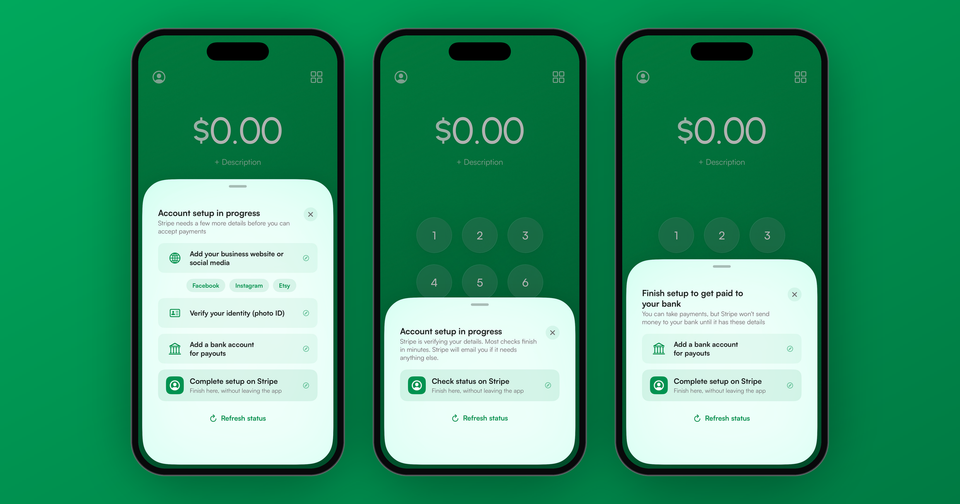
Before Stripe lets a new account take payments, it needs to know who you are, what you sell and where to send your money. Until it has all of that, the Payment app shows an account setup screen in place of the charge button, listing exactly what Stripe is still waiting on. The good news is that most of what holds accounts up takes a couple of minutes to fix.
What does each account status mean?
The setup screen will tell you which of these situations you're in:
- Stripe needs a few more details. There are specific items to add, and the app lists them for you.
- Stripe needs these details soon. Something is past due. Your account is restricted, or will be shortly, until it's added.
- Stripe is verifying your details. There's nothing for you to do. Most checks finish in minutes, and Stripe will email you if it needs anything else.
- Finish setup to get paid to your bank. You can take payments, but Stripe is holding your payouts until it has the rest of your details.
- Payments paused, or Stripe can't accept payments for this account. These come from Stripe's review team, and only Stripe can explain or reverse them.
Why does Stripe need a business website?
Of all the accounts we see waiting on Stripe, more than half are only missing simple details, and the business website is by far the most common one. Stripe is required to understand what each business sells, and your website is how it checks. In some cases the website was never entered. Oftentimes, Stripe tried to visit it and failed, with a message like "Website couldn't be reached" or "Website review blocked by password protection."
Stripe's review is looking for two things on the page: your business name, and a description of what you sell that matches what you told Stripe. It also needs to load for anyone, without a password, a login or a region block. A page that's still under construction will generally be rejected.
What if I don't have a website?
You don't need one. Stripe accepts a social media profile or an app listing in place of a website, and many of our merchants use a Facebook page, an Instagram profile or an Etsy shop. It needs to be the full link, like https://instagram.com/yourbusiness, rather than just your @handle. Make sure the profile is public, uses your business name and shows what you sell.
Imagine the following scenario: You sell candles at weekend markets and have never needed a website. Your Instagram has photos of every scent you make, with prices in the captions. Entering https://instagram.com/yourcandleshop as your business website gives Stripe everything it needs.
However, don't borrow a link that isn't yours, like a friend's site or the market's event page. Stripe checks that the website represents your business, and a link that doesn't can lead to your account being closed rather than approved.
What else commonly needs fixing?
After the website, these are the items we see most often:
- Support phone number. A number customers can reach you on.
- Product description. A sentence or two about what you sell.
- Bank account. Where Stripe sends your payouts.
- Stripe's terms of service. Accepted with a single tap.
- Identity verification. A photo ID, or your Social Security Number in the US. These can take longer if Stripe can't match them automatically.
How do I fix it?
Tap the button on the setup screen, and Stripe's own account page opens right inside the app. Sign in, fill in what's listed, and come back. The app checks your status again as soon as you return, so in most cases you can take your first payment a few minutes later.
Lastly, if you'd rather do it from a computer, everything is on the account status page in your Stripe Dashboard. Stripe will only accept identity documents through the Dashboard, never by email.
Learn more about what Stripe asks for and why: The ins and outs of Stripe Account verification
Haven't connected your Stripe account to the app yet? See how connecting a Stripe account works.