Yes, Stripe sells its own card readers, and the right one depends on whether you sell at a counter, on the move, or with no hardware at all. Every option below works with the Payment app, from the phone already in your pocket to a countertop terminal with a built-in printer.
The lineup
| Reader | Price | Connectivity | Where |
|---|---|---|---|
| Tap to Pay (your phone) | Free | Your phone | iPhone: 22 countries. Android: 21 countries |
| Stripe Reader M2 | $59 | Bluetooth | US only |
| WisePad 3 | Varies by region | Bluetooth | Outside the US |
| WisePOS E | $249 | WiFi or Ethernet | Countries Stripe Terminal supports |
| Stripe Reader S700/S710 | $299+ | WiFi (S710 adds cellular) | Countries Stripe Terminal supports |
| Stripe Reader T600 | $329 | WiFi (Ethernet with the $39 Reader Hub) | US, Canada, UK, Australia, much of Europe |
| Verifone V660p | $399 | WiFi + Ethernet | US |
Prices are Stripe's US prices as of October 2026. Readers process at Stripe's in-person rate, 2.7% + 5¢ in the US, which is lower than the 2.9% + 30¢ online rate you'd pay for a card typed into the app. Tap to Pay is Stripe's in-person rate plus 10¢ per authorization, so 2.7% + 15¢ in the US. On top of Stripe's fees, the app fee is 1.2% per sale with a 15¢ minimum (accounts created before September 9, 2026 pay 1.2% with no minimum). There are no monthly fees or contracts.
Do I need a reader at all?
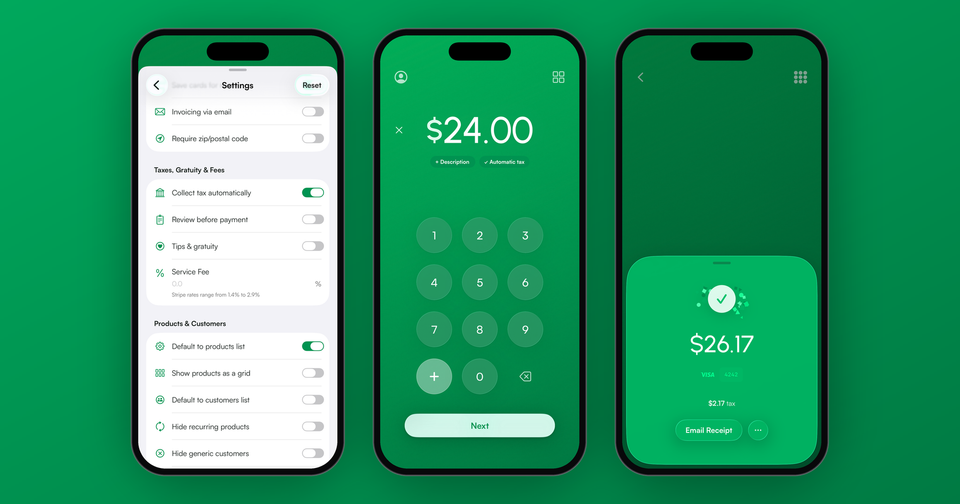
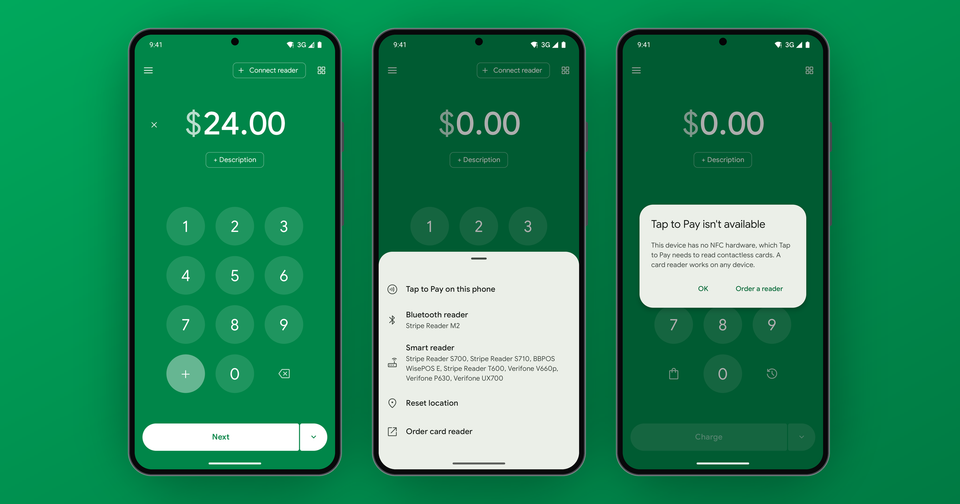
Maybe not. Tap to Pay accepts contactless cards, Apple Pay and Google Pay with no hardware. In the Payment app it needs an iPhone XS or later on iOS 18 or later, or an Android phone on Android 13 or later with NFC. The limits are that it takes contactless only (no chip slot, no swipe) and it always needs a connection. For many new businesses it's the answer, and you can add hardware later. We break down each tap in Stripe Tap to Pay fees.
On the go: M2 or WisePad 3
The Stripe Reader M2 is a $59 pocket-sized Bluetooth reader that adds chip and swipe on top of contactless. It's the one we recommend for most US merchants. Outside the US the WisePad 3 is the portable choice, with a built-in PIN pad, which many countries require. Both can take offline payments if you switch on Allow offline payments under Settings, though an offline payment isn't authorized until it syncs, so a decline only shows up later.
At the counter: WisePOS E, S700 or T600
The WisePOS E is a customer-facing smart terminal: the customer sees the amount, picks a tip, and taps or inserts their card themselves. Your phone still drives the sale, and it always needs a connection. The Stripe Reader S700 runs the Payment app on the device itself, so there is no phone in the loop. If you want one device at the register instead of two, it's the cleaner setup, and the S710 adds cellular. Offline works on an S700 or S710 running the app, but not if you pair it to a phone over WiFi.
The Stripe Reader T600 is Stripe's newest countertop reader, with an 8-inch screen facing your customer. Like the S700, it runs the Payment app on the reader itself. It has no battery, so it stays plugged in at the register, and if you'd rather use Ethernet than WiFi, Stripe sells a $39 Reader Hub for it. It costs $329 in the US and is also sold in Canada, the UK, Australia and much of Europe.
Need printed receipts? The V660p
The Verifone V660p is a countertop reader with a built-in receipt printer, and it supports Stripe's standalone mode, which takes payments with no app at all. Restaurants, salons and repair shops tend to like it. More in our V660p post.
Does a reader work in my country?
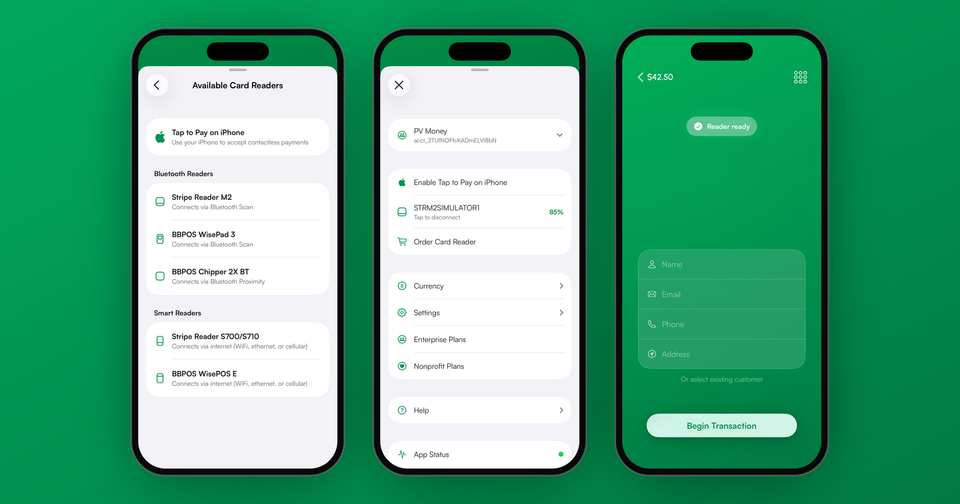
Readers charge in your Stripe account's home currency wherever you carry them, because Terminal requires local currency based on the account's country. A reader can't be used abroad for local-currency sales without a second Stripe account there. Order only from the Stripe Terminal shop, since readers bought elsewhere are locked to other platforms and won't pair. The older BBPOS Chipper 2X BT still works with the app but is no longer sold.
How do I connect a reader to the app?
On iPhone, open the menu, tap Connect Card Reader, then choose your reader under Bluetooth Readers. On Android, tap Connect reader at the top of the charge screen, then Bluetooth reader, and pick the serial number that matches yours. Enter an amount and follow the prompt to tap, insert or swipe.
Our recommendation
Start free with Tap to Pay. Add an M2 (or WisePad 3 abroad) when you need chip cards or offline mode, and move to an S700, T600 or V660p for a dedicated counter device. Readers aren't exclusive either, so a market stall on Tap to Pay and a shop counter reader can feed the same Stripe account.